This is the tab in which the entity is defined.
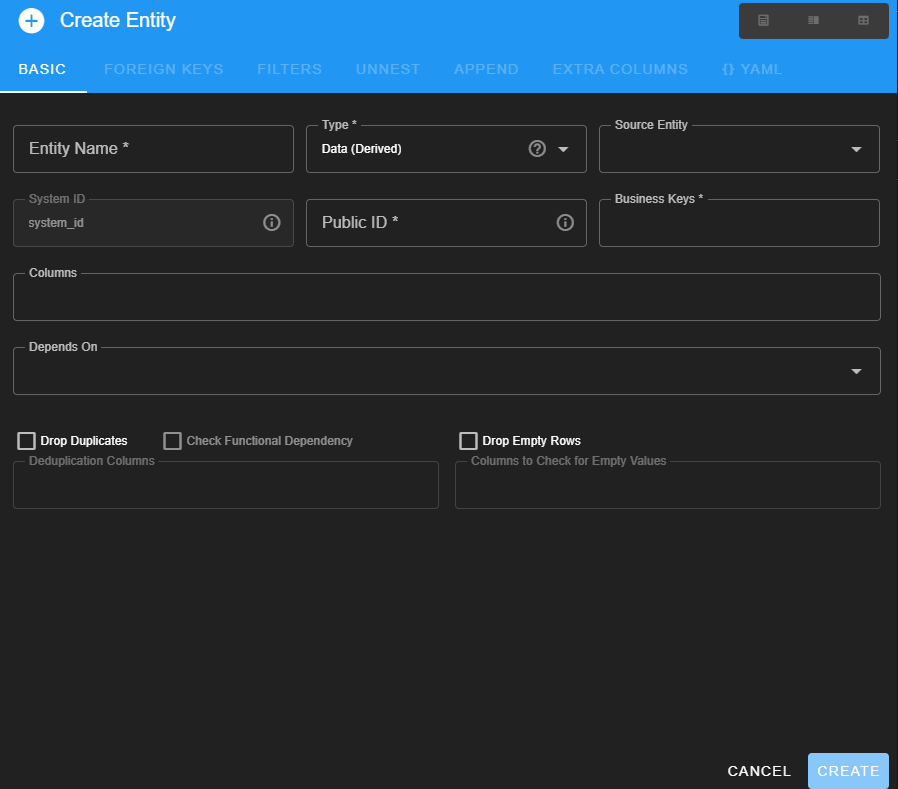 The following table gives more information about boxes for entering information.
| Box name | Type | Drop-down menu contents | What to enter |
|---|---|---|---|
| Entity name | free-form | Enter a name for this entity (e.g. sites). | |
| Type | drop-down menu | Data (derived) SQL Query Fixed Values CSV File Excel File (Pandas) Excel File (OpenPyXL) | In what form is the incoming data set? (See below for more information on each type) |
| Source Entity (only present for certain Types above) | drop-down menu | (drop down contents change based on Type) | The incoming data set |
| System ID | pre-set | (Don’t enter, the system will fill this one in) | |
| Public ID | free-form | The primary key for this table. Use the same name as used in SEAD. (e.g. for the archaeological sites, enter site_id here) | |
| Business Keys | free-form | The list of columns in the incoming data that are needed to uniquely define each row of data for the incoming data set (if more than one column is needed). | |
| Columns | free-form | Choose (if this is a data-derived entity) or enter all of the columns from the incoming data set that are assiociated with this entity | |
| Depends On | free-form | This box is used to define dependencies. In some datasets every site has to have a defined site type. the “before you can do X you need to know Y” sorts of information Note: If this is a “derived” entity then the dependency is already defined on what you derived it from Warning: If this step is done wrong, the validation will fail | |
| Drop Duplicates | check box | This step is how you get a complete list of each unique category of data (a “look-up” table, for example, a list of all sites in a dataset, or a list of all feature types), This works the same was as Excel’s drop duplicates function. | |
| Check Functional Dependency | check box | This button asks the program to confirm that if one considers only the columns entered in the “drop duplicates” column that three aren’t examples of (for example) a single site with multiple coordinate systems | |
| Drop Empty Rows | check box | Will drop any rows that are blank for the specified column. This does not change the incoming dataset, only the contents of this entity. | |
| Deduplication Columns | free-form | Defines the columns needed to get a unique set (example site name plus national site id ) | |
| Colums to Check for Empty Values | free-form | Use this for columns so important that that it doesn’t mater if data exists in other columns | |
| SQL Query (only present if Type = SQL Query) | free-form | Write a query that extracts all the pertinent columns from the data set for the table you are working on. | |
| Data (derived) use with either a [[7. Glossary#data-sources | Data Source]] or a [[7. Glossary#files | File]] that you have uploaded | |
| SQL Query use if you want to use an SQL query to extract data from a data source | |||
| Fixed Values useful for entities that contain the same information for the entire data set (e.g. location = Sweden), of if the data is on paper, and it needs entering to be machine readable, or it is a data type that doesn’t exist in the incoming dataset, but is required in SEAD | |||
| CSV File use if you have unloaded a [[7. Glossary#files | File]] in .csv format | ||
| Excel File (Pandas) or (OpenPyXL) both formats will read an Excel file. |
- learn how use Shape Shifter to pull the corresponding id number for specific things that already exist in SEAD (e.g. certain sites, locations, feature types, taxa, etc.)
- learn how to use Shape Shifter to let SEAD know that a specific thing is not already present in SEAD and will need a new id number (e.g. sites, locations, feature types, taxa, etc.)
Next: 2.1.2 Foreign Keys Tab