Shows the Foreign Keys that are already defined.
Press the +ADD button to open a form to define a new (as yet unnamed) entity ? > ?
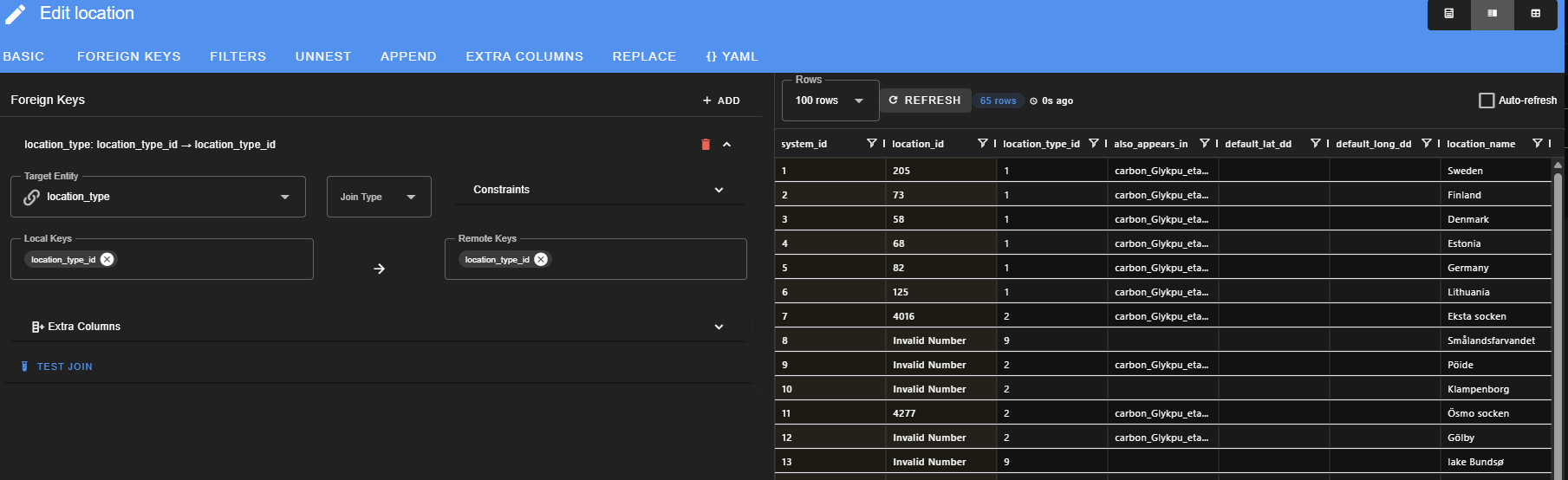
The above image shows the relationship between the location and location_type entities by specifying that the loication_type_id field in this table (location) shares the same values as the location_type_id of the location_type entity table. Note: a corresponding Foreign Key is not defined under the locations_type entity, as it would be redundant
At the time the screenshot was made there were exactly three defined Foreign Keys for the project, showing the connections between site_location to both site and locations, and the connection between location and location_types, as displayed in this graph (see also section 2.2 Graph):

| boxes to fill in | type of box | what is in the drop-down menu? | comments |
|---|---|---|---|
| Target Entity | drop-down menu | all entities that are already defined for this project | The entity for which you will define the relationship with the entity you are currently editing. |
| Join Type | drop-down menu | Inner Join Left Join Right Join Outer Join Cross Join | this is where you can define joins that are not defined by keys (see below) |
| Constraints | drop-down menu ----- check boxes | One to One One to Many Many to One ----- Require Unique Left Allow Null Kes | this is additional important information needed if you use the above Join Type drop down menu |
| Local Keys | drop-down menu | all columns that exist for entity you are currently editing | choose the appropriate column with a name ending in _id |
| Remote Keys | free-form | type the name of the appropriate column from the Target Entity, with a name ending in _id | |
| Extra Columns | free-form | use this if you need to define an additional column in this table to be included after the join |
Next: 2.1.3 Filters Tab